ResidentSynth Host

When the application starts up, it first locates the available hardware input and output devices and loads the ResidentSynth. The hardware devices are then made available in the relevant selector controls. Both the host and the synth are then configured while a corresponding message is displayed. When ready, the message is replaced by the “continue” button that can be seen in the above screenshot.
The application is best used with an attached MIDI input device such as a hardware keyboard. This requires that the browser supports the Web MIDI MIDIInput interface. All the major browsers (except Safari) do this in 2024.
The application is best used with an attached MIDI input device such as a hardware keyboard. This requires that the browser supports the Web MIDI MIDIInput interface. All the major browsers (except Safari) do this in 2024.
When the user clicks the “continue” button, the following main GUI appears. This contains separate panels for the controls that are implemented by the ResidentSynth
and those that are implemented only by the host. The ResidentSynth Controls are those that can be accessed using synth’s MIDI interface .
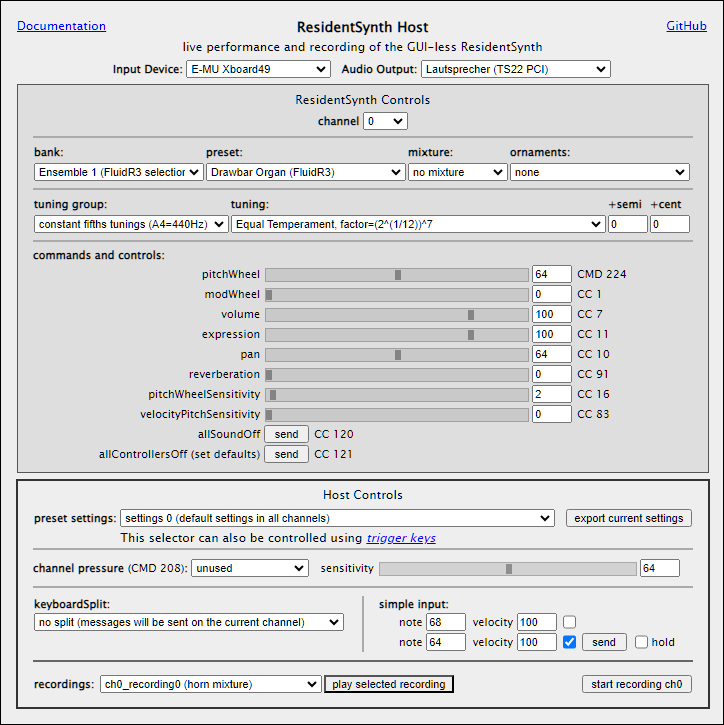
host’s residentSynth controls
Except for the channel, these controls all have equivalent MIDI messages that will be sent to the ResidentSynth when the control changes.
channels

The ResidentSynth has 16 independent channels. Each channel can be edited separately, one at a time, by selecting it in this control. When selected, the channel’s current settings are loaded into the controls in the rest of the panel.
sounds (banks, presets, mixtures, ornaments)
These are the banks currently defined for the ResidentSynthHost. For test and demonstration purposes, this list is longer than would typically be the case in other installations.
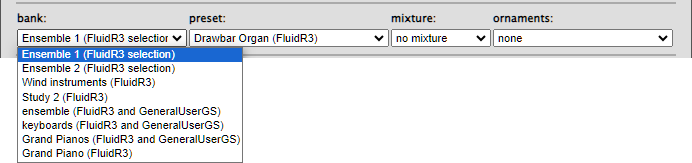 The presets available in the presets selector change dynamically according to the currently selected bank. The presets configured for the first bank ("Ensemble 1") are as follows:
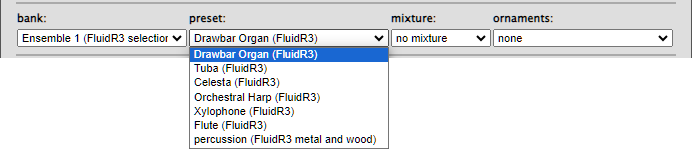
The presets available in the presets selector change dynamically according to the currently selected bank. The presets configured for the first bank ("Ensemble 1") are as follows:
Banks and presets must be configured for the ResidentSynth. (Mixtures and ornaments are optional.)
To configure banks and presets:
To configure banks and presets:
- Ensure that the application’s residentSynth folder exists (see installing the ResidentSynth in other applications).
- Download the required WebAudioFont instruments from Surikov’s Web Audio Font page, and put them in the emptied residentSynth/config/presets folder.
- Add the presets’ names to the application's main .html file (see, for example, the files included at the end of host.html), so that the information will be loaded when the application starts.
- Edit the residentSynth/config/webAudioFontDef.js file appropriately.
This file must be present, and must define at least one bank containing at least one preset. There can be up to 127 banks, each of which can contain up to 127 presets.
The
banks and presets will then load automatically with the ResidentSynth, and it will react in the usual way to standard MIDI bank and preset messages. The ResidentSynthHost sends the currently selected index in its bank and preset controls as the values of those messages.
A mixture is, like an organ-stop, a group of notes that play as a chord when the ResidentSynth receives a single noteOn message, and stop when the corresponding noteOff arrives.
These are the names of the mixtures currently defined for the ResidentSynthHost:
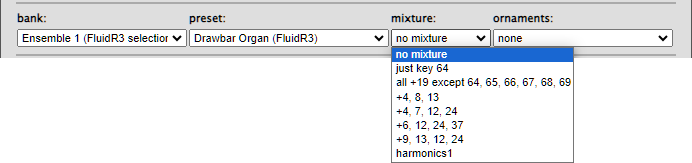
Mixtures can be configured by editing the installation’s residentSynth/config/mixtureDefs.js file.
The original ResidentSynthHost’s file contains detailed instructions.
The original ResidentSynthHost’s file contains detailed instructions.
If the installation has such a file, and mixtures are defined, the host can send (non-standard) MIDI mixture messages to the ResidentSynth to control the current mixture. The ResidentSynthHost sends the currently selected index in its mixture control as the value in such messages.
If the mixtureDefs.js file is missing, MIDI mixture messages will throw an exception, and all notes will be played simply, without an additional mixture.
An ornaments definition contains a list of
<midiKey:ornament> pairs linking individual ornament definitions with particular keys.
Each defined ornament can be associated with more than one key.
These are the names of the ornaments definitions currently defined for the ResidentSynthHost:

Ornaments
and individual ornament types can be defined using the residentSynth/config/ornamentDefs.js file.
The original ResidentSynthHost’s file contains detailed instructions.
The original ResidentSynthHost’s file contains detailed instructions.
If the installation has such a file, and ornaments are defined, the host can send (non-standard) MIDI ornaments messages to the ResidentSynth to control the current ornaments. The ResidentSynthHost sends the currently selected index in its ornaments control as the value in such messages.
If the ornamentDefs.js file is missing, the MIDI ornaments message will throw an exception, and all notes will be played simply, without being ornamented.
If the ornamentDefs.js file is missing, the MIDI ornaments message will throw an exception, and all notes will be played simply, without being ornamented.
tuning (tuning groups, tunings, fine tuning)
A tuning group is a set of tunings that have been created using the same algorithm.
These are the tuning groups currently defined for the ResidentSynthHost:
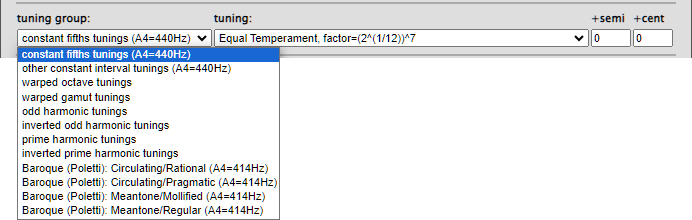
A tuning associates each of the 127 MIDI keys with its own pitch value, expressed as (floating point) equal temperament semitones above MIDI C0.
The tunings available in the tuning selector change dynamically, depending on the currently selected tuning group. The tunings currently defined for the first tuning group (“
A tuning associates each of the 127 MIDI keys with its own pitch value, expressed as (floating point) equal temperament semitones above MIDI C0.
The tunings available in the tuning selector change dynamically, depending on the currently selected tuning group. The tunings currently defined for the first tuning group (“
constant fifths tunings”) are:
Tuning groups and tunings can be defined by editing the installation’s residentSynth/config/tuningDefs.js file.
The original ResidentSynthHost’s file contains detailed instructions.
The original ResidentSynthHost’s file contains detailed instructions.
If the installation has such a file, and tunings are defined, the host can send (non-standard) MIDI tuning group and tuning messages to the ResidentSynth to control the current group and tuning. The ResidentSynthHost sends the currently selected index in its tuning group and tuning controls as the values in such messages.
If the tuningDefs.js file is missing, Standard Equal Temperament will be used, and MIDI tuning group and tuning messages will throw an exception. Such messages also throw exceptions if their values are outside the configured range.
If the tuningDefs.js file is missing, Standard Equal Temperament will be used, and MIDI tuning group and tuning messages will throw an exception. Such messages also throw exceptions if their values are outside the configured range.
Fine tuning:
The +semi and +cent controls are integer inputs that determine the tuning offset in semitones and cents with respect to the currently defined tuning. The +semi control takes values in the range -64 to +63. The +cent control takes values in the range -50 to +50. Pitches that would end up exceeding the MIDI range (0..127) are silently coerced to the standard pitch associated with either MIDI key 0 or 127.
Note that the values of the associated MIDI messages, sent to the ResidentSynth, is calculated by adding 64 to the values of these controls. The ResidentSynth simply subtracts 64 from the value it receives before implementing the required transposition.
The +semi and +cent controls are integer inputs that determine the tuning offset in semitones and cents with respect to the currently defined tuning. The +semi control takes values in the range -64 to +63. The +cent control takes values in the range -50 to +50. Pitches that would end up exceeding the MIDI range (0..127) are silently coerced to the standard pitch associated with either MIDI key 0 or 127.
Note that the values of the associated MIDI messages, sent to the ResidentSynth, is calculated by adding 64 to the values of these controls. The ResidentSynth simply subtracts 64 from the value it receives before implementing the required transposition.
commands and controls
The slider controls are linked to their adjacent integer input controls. Changing one, automatically changes the state of the other. These controls also react to incoming MIDI messages: On my MIDI input device, they can also be set using the appropriate hardware wheels and knobs.
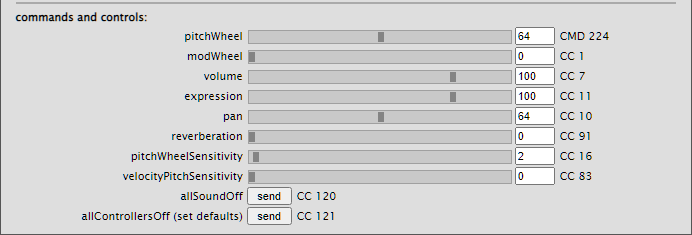
The current set of controls can be seen in the following screenshot.
Except for reverberation, pitchWheelSensitivity and velocityPitchSensitivity, these are all standard MIDI commands and controls. For details, see MIDI messages for the ResidentSynth. It would be quite easy to extend these controls to include other native Web Audio effects such as low- and high-pass filters.
volume and expression are two standard MIDI controls that combine to set loudness: volume is used to set a channel’s balance with respect to other channels. expression is used for local variations (hairpins, accents etc.).
The reverberation control controls reverberation. ( ! )
The pitchWheelSensitivity control is a simple replacement for the rather cumbersome procedure used by standard MIDI to change the range of the pitch wheel. Its value is the pitchWheel’s range in semitones.
The velocityPitchSensitivity control raises an individual note's output pitch depending on its velocity. The maximum pitch deviation (at velocity 127) is this value/10 semitones. In other words, in Equal Temperament, if this value is 0, the velocity will have no effect on the pitch; if this value is 10, velocity 127 will raise the pitch by 1 semitone; if this value is 127, velocity 127 will raise the pitch by 12.7 semitones.
The reverberation control controls reverberation. ( ! )
The pitchWheelSensitivity control is a simple replacement for the rather cumbersome procedure used by standard MIDI to change the range of the pitch wheel. Its value is the pitchWheel’s range in semitones.
The velocityPitchSensitivity control raises an individual note's output pitch depending on its velocity. The maximum pitch deviation (at velocity 127) is this value/10 semitones. In other words, in Equal Temperament, if this value is 0, the velocity will have no effect on the pitch; if this value is 10, velocity 127 will raise the pitch by 1 semitone; if this value is 127, velocity 127 will raise the pitch by 12.7 semitones.
host’s own controls
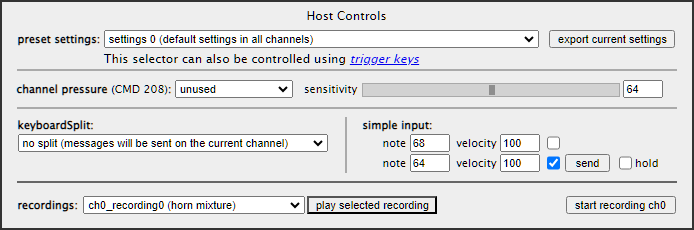
All the above controls affect the state of the ResidentSynthHost. The preset settings control also sets the state of the ResidentSynth. Messages sent to the ResidentSynth that originate from the channel pressure and simple input controls, will be on the channel set in the ResidentSynth Controls panel, unless a
keyboardSplit is defined and set here. The Input Device's channel is always ignored.
The preset settings, keyboard split, and recordings controls can be configured using files whose information is loaded into the ResidentSynthHost when its main page loads (see below).
preset settings, trigger keys, export settings

The preset settings selector is used to select a 16-channel preset setting.
Such settings can be configured using the ResidentSynthHost’s config/synthSettingsDefs.js file. If present, this file defines the available settings, and the settings defined for the first preset are loaded into the synth’s 16 channels. If the file is missing, all controls in all channels are set to their default values. Detailed instructions can be found in the current config/synthSettingsDefs.js file.
trigger keys: The preset settings selector can be set in the usual way, in the GUI, or by using trigger keys on the (normal, often QUERTY) keyboard:
Triggers are particularly interesting in connection with “modulation” between odd harmonic tunings and prime harmonic tunings...
Such settings can be configured using the ResidentSynthHost’s config/synthSettingsDefs.js file. If present, this file defines the available settings, and the settings defined for the first preset are loaded into the synth’s 16 channels. If the file is missing, all controls in all channels are set to their default values. Detailed instructions can be found in the current config/synthSettingsDefs.js file.
trigger keys: The preset settings selector can be set in the usual way, in the GUI, or by using trigger keys on the (normal, often QUERTY) keyboard:
The <space> key, increments/rotates the selected setting.
The '0'..'9' keys select settings 0 to 9 respectively.
The 'a'..'z' keys select settings 10..35 respectively.
Keys whose value is greater than the number of available settings, are equivalent to the <space> key.
The '0'..'9' keys select settings 0 to 9 respectively.
The 'a'..'z' keys select settings 10..35 respectively.
Triggers are particularly interesting in connection with “modulation” between odd harmonic tunings and prime harmonic tunings...
The export current settings button saves all 16 channels of the current settings in a JSON file (on Windows, the file is saved in the user’s Downloads folder). The exported channel settings can then be edited into the relevant channel in the configuration file, and loaded into the preset settings selector when the application restarts.
channel pressure
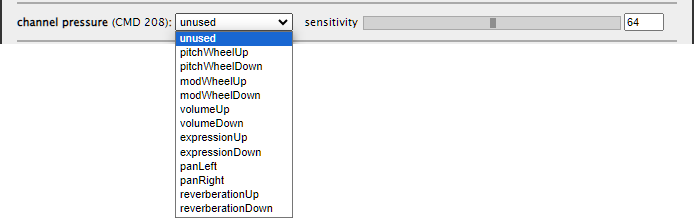
The ResidentSynthHost can change any channel pressure messages (CMD 208) it receives into messages of the types listed in the channel pressure options control before sending them on to the ResidentSynth.
The values used in the messages to the ResidentSynth are calculated using
- the current value of the selected control (as set in the commands and controls section)
- the value of the incoming channel pressure message
- the value of the sensitivity control (a connected slider and integer input having the range 0..127)
messageValue
=
currentControlValue
±
(channelPressureValue
×
(sensitivityValue
÷
127))
messageValue < 0, it is silently set to 0. If messageValue > 127, it is silently set to 127.
keyboard split and simple input

The keyboard split selector can be used to select a keyboard split configuration that has been defined using the config/keyboardSplitDefs.js configuration file. If the file is missing, all keys will send messages to the ResidentSynth on the currently displayed channel. The input device’s channel is always ignored.
Detailed instructions can be found in the current config/keyboardSplitDefs.js file.
Detailed instructions can be found in the current config/keyboardSplitDefs.js file.
The simple input controls can be used regardless of whether there is a hardware MIDI Input device attached to the computer.
They can also be useful while debugging, since both hands can be kept physically free while holding a note.
recordings
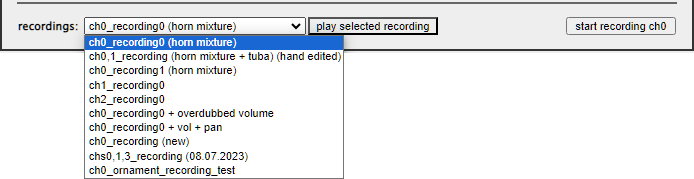
The ResidentSynthHost can record and save the MIDI messages it sends to the ResidentSynth. Such recordings are saved to the user's system Downloads folder, and can be copied from there to the ResidentSynthHost’s config/recordings.js file from which they will be loaded into the recordings selector on startup. The config/recordings.js file may be missing or empty.
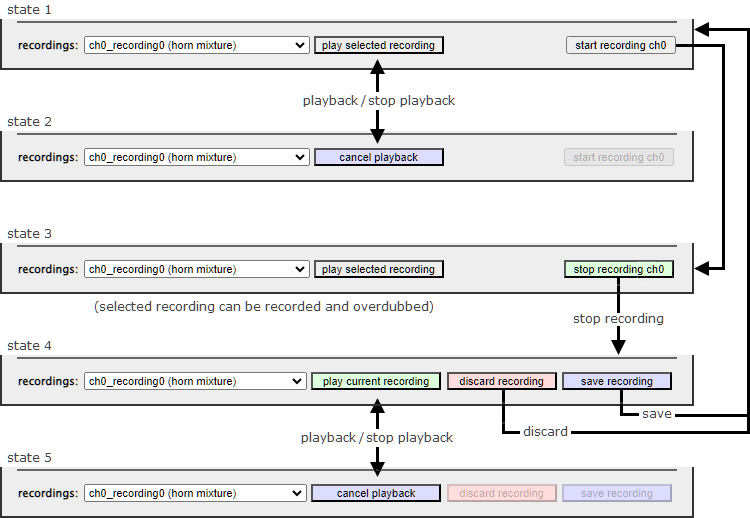
The buttons in this region of the Host Controls change, and change state, as in the following diagram:
In state 1, clicking the play selected recording button plays the selected recording and sets state 2.
In state 2, clicking the cancel playback button stops playback, and sets state 1.
In state 1, clicking the start recording ch0 button initiates recording of channel 0 (The channel index changes dynamically, depending on the channel set in the ResidentSynth Controls panel.), and sets state 3. In this state, clicking play selected recording will overdub the selected recording into new recording.
In state 3, clicking the stop recording button stops recording and sets state 4.
In state 4, the new recording can be played back without saving, discarded or saved. Clicking the play current recording plays the new recording and sets state 5. Clicking discard recording discards the recording and sets state 1. Clicking save recording saves the recording in the users system Downloads folder before setting state 1.
In state 5, clicking cancel playback stops playback and resets state 4.
In state 1, clicking the play selected recording button plays the selected recording and sets state 2.
In state 2, clicking the cancel playback button stops playback, and sets state 1.
In state 1, clicking the start recording ch0 button initiates recording of channel 0 (The channel index changes dynamically, depending on the channel set in the ResidentSynth Controls panel.), and sets state 3. In this state, clicking play selected recording will overdub the selected recording into new recording.
In state 3, clicking the stop recording button stops recording and sets state 4.
In state 4, the new recording can be played back without saving, discarded or saved. Clicking the play current recording plays the new recording and sets state 5. Clicking discard recording discards the recording and sets state 1. Clicking save recording saves the recording in the users system Downloads folder before setting state 1.
In state 5, clicking cancel playback stops playback and resets state 4.
currently implemented tunings (2024)
First, some definitions:
and the (floating point) number of equal temperament semitones between two frequencies is returned by the following javascript function:

- A MidiKey is an integer in range 0..127. This is the MIDI key value sent in MIDI messages.
If the message is sent from a keyboard, the MidiKey value designates a physical key on the keyboard. - A MidiPitch is a floating point value in range 0..<128. It is the number of Equal Temperament semitones above the MidiPitch of MidiKey 0, which is always 0.00.
- A Tuning is an array of 128 MidiPitch values. Tuning[MidiKey] is the MidiPitch of the MidiKey in that Tuning. By convention, the MidiPitches in a Tuning are always in ascending order.
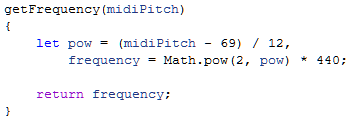
So, by definition, MidiKey 69 (A4) has MidiPitch 69.00 in an Equal Temperament Tuning and, using the standard A4 = 440Hz, MidiPitch 69.00 is equivalent to the frequency 440Hz.
In general, the frequency of a MidiPitch is given by the following function:and the (floating point) number of equal temperament semitones between two frequencies is returned by the following javascript function:
Tunings can be configured by editing the host’s residentSynth/config/tuningDefs.js file.
In that file, the
In that file, the
ResSynth.tuningDefs array defines groups of tunings characterised by their constructor type, with each individual tuning definition providing its own particular argument values to its constructor.
constant fifths tunings
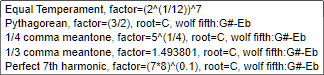 |
Each constant fifths tuning is defined by multiplying or dividing successive frequencies by a constant factor that corresponds to an interval of a “fifth”, then creating octave equivalents in all octaves. Each Tuning:
|
other constant interval tunings
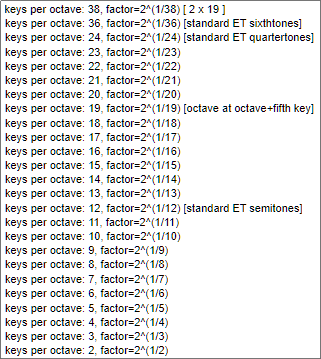 |
Each other constant interval tuning has a different number of MidiKeys between frequencies that are an octave apart, whereby the frequency ratio between adjacent MidiKeys is constant throughout the Tuning.
Tunings are created by setting MidiKey 69 (A4) to MidiPitch 69.00 (=440Hz) and multiplying or dividing the frequencies of neighbouring keys by the given factor. |
warped octave tunings
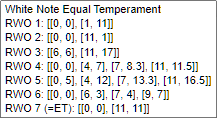 |
In each warped octave tuning, keys that are physically an octave apart also sound an octave apart, but the interval between neighbouring keys varies. |
The MidiPitches of warped octave tunings are calculated using an array of [MidiKey, MidiPitch] arrays that define the MidiPitches of MidiKeys in the lowest MIDI octave. Both components of the inner arrays are greater than or equal to 0, and in ascending order. MidiKey values are less than 12. MidiPitches are treated mod 12. MidiPitches are first allocated in the order given by the inner arrays, then the MidiPitch of each undefined MidiKey is interpolated to give equal intervals between the defined pitches.
warped gamut tunings
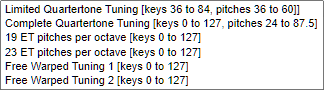 |
In each warped gamut tuning, the interval between neighbouring keys varies. MidiKeys that are physically an octave apart do not necessarily sound an octave apart. As always, MidiPitches are in ascending order in each Tuning. |
As with warped octave tunings, warped gamut tunings are calculated using an array of [MidiKey, MidiPitch] arrays that define the MidiPitches of MidiKeys, and both components of the inner arrays are greater than or equal to 0, and in ascending order. However, the upper limit of both MidiKey and MidiPitch values is now less than 128.
As with warped octave tunings, MidiPitches are first allocated in the defined order, then the MidiPitch of each undefined MidiKey is interpolated to give equal intervals between the defined pitches. MidiKeys that are still undefined are then given their standard MidiPitch (=MidiKey).
As with warped octave tunings, MidiPitches are first allocated in the defined order, then the MidiPitch of each undefined MidiKey is interpolated to give equal intervals between the defined pitches. MidiKeys that are still undefined are then given their standard MidiPitch (=MidiKey).
The arguments for the defined warped gamut tunings are as follows:
Limited Quartertone Tuning:
Complete Quartertone Tuning:
19 ET pitches per octave:
23 ET pitches per octave:
Free Warped Tuning 1:
Free Warped Tuning 2:
Limited Quartertone Tuning:
[[36,6],[84,60]]Complete Quartertone Tuning:
[[0,24],[127,87.5]]19 ET pitches per octave:
[[0,12],[19,24],[38,36],[57,48],[76,60],[95,72],[114,84],[127,127]]23 ET pitches per octave:
[[0,12],[23,24],[46,36],[69,48],[92,60],[115,72],[127,127]]Free Warped Tuning 1:
[[0,0],[60,60],[65,79],[90,90],[127,127]]Free Warped Tuning 2:
[[0,0],[60,60],[65,62.5],[72,72],[127,127]]
harmonic tunings
Each harmonic Tuning contains frequencies that belong to a single harmonic series above its root, and their octave transpositions. In other words, the Tuning's root frequency is multiplied by 12 rational numbers in turn, and the twelve resulting MidiPitches are transposed into the octaves available in the 127-MidiKey Tuning.
By convention, the MidiPitch of each root MidiKey in each harmonic Tuning (in all octaves) is equal to the MidiKey. In other words: The root MidiKeys always have their equal temperament frequencies. This is just a convention, since it is always possible to transpose Tunings using the ResidentSynth's +semi and +cent fine tuning controls.
By convention, the MidiPitch of each root MidiKey in each harmonic Tuning (in all octaves) is equal to the MidiKey. In other words: The root MidiKeys always have their equal temperament frequencies. This is just a convention, since it is always possible to transpose Tunings using the ResidentSynth's +semi and +cent fine tuning controls.
odd harmonic tunings
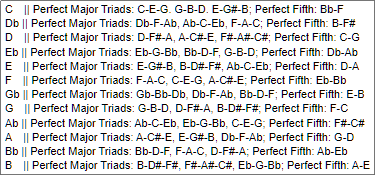 |
In each odd harmonic tuning, the 12 keys in each octave are tuned to octave transpositions of the first 12 odd harmonics in the harmonic series above the tuning’s root. To provide an extra perfect major third (ratio 5/4), the 25th harmonic is used instead of the 23rd. See below. Each tuning thus contains three perfect major triads, and an additional perfect fifth (see below). |
The MidiPitches of the basic odd harmonic tuning, whose root is C, are calculated as follows:
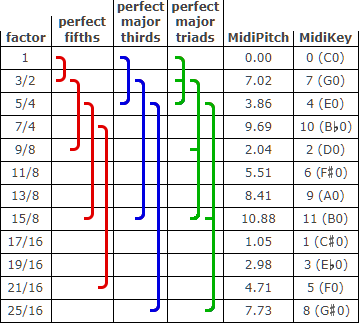
The remaining tunings are constructed as follows:
- The first 12 odd harmonic ratios are first transposed into the octave above the root, by multiplying each denominator by a power of 2, so that the ratio is greater than or equal to 1, and less than 2. See column 1 in the table below. Note that, as an exception, 25/16 is used instead of 23/16, resulting in a perfect major third (ratio 5/4) between MidiKey 4 and MidiKey 8.
- The equivalent intervals (in equal temperament semitone units) are then calculated using the numerators and denominators of these ratios. The above
getSemitones(frequency1, frequency2)function uses the ratio between its arguments, so the numerators and denominators can be used directly, rather than using frequencies:getSemitones(numerator, denominator). Adding the resulting intervals to MidiPitch 0.00 (at MidiKey 0) gives the MidiPitches in column 5. - MidiKeys are allocated in ascending MidiPitch order (column 6).
- Upper octaves in the tuning are created by simply adding 12.00 semitones per octave to the lowest octave. For example, the MidiPitch at Tuning[8+12] is Tuning[8] + 12.00.
The remaining tunings are constructed as follows:
- "rotate" the MidiPitches in the original 12 value C0 Tuning for each root, transposing an octave down where necessary.
- add each Tuning’s rootKey value to each of its MidiPitches, so that Tuning[rootKey] is equal to rootKey.
This gives the following table for the MidiPitches in the lowest octave: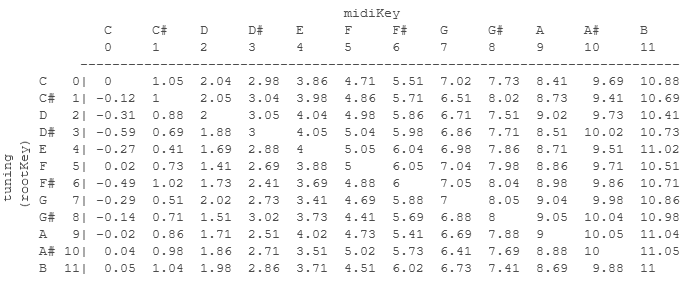
- Use this table to calculate the MidiPitches in the upper octaves of each Tuning. (Simply add 12.00 semitones per octave for each MidiPitch.)
- As a precaution, set all the negative MidiPitches in C0 to 0.00.
The ResidentSynthHost can instantly change its Tuning, +semi and +cent control settings, so shifting seamlessly between arbitrary Tunings on arbitrary MidiKeys is always possible but, since all odd harmonic tunings contain three perfect major triads, pivoting between Tunings can also be done around these.
For example: the C-major triad CEG exists in tunings F and A-flat so, adjusting the MidiPitch of Tuning F so that MidiKey C has the MidiPitch it has in Tuning A-flat, will preserve the relations between the frequencies in the major triad CEG.
Interesting symmetry: Each major triad is contained in three tunings, and each tuning contains three major triads.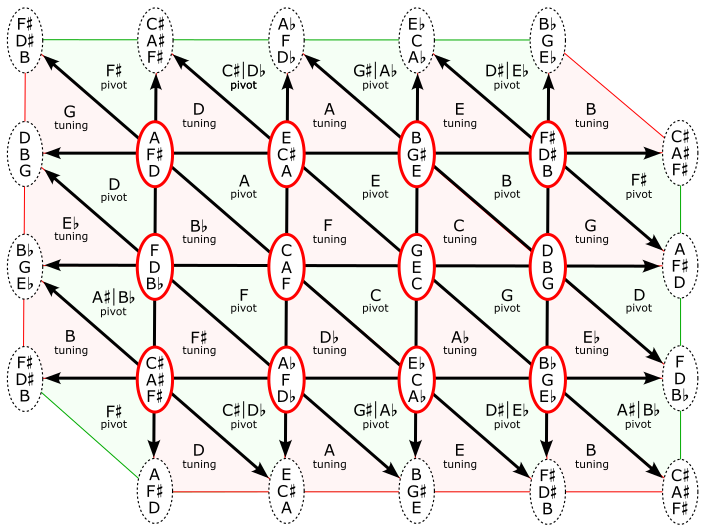
Topologically, this diagram could be drawn on a horizontal torus.
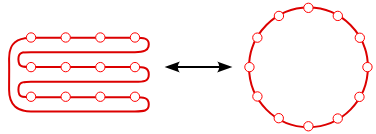
Moving horizontally shifts the root up or down a perfect fifth, as when moving around the cycle of fifths:
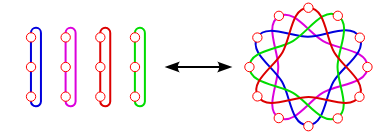
Moving vertically shifts up or down a major third:
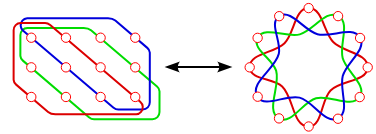
Moving diagonally shifts up or down a minor third:
For example: the C-major triad CEG exists in tunings F and A-flat so, adjusting the MidiPitch of Tuning F so that MidiKey C has the MidiPitch it has in Tuning A-flat, will preserve the relations between the frequencies in the major triad CEG.
Interesting symmetry: Each major triad is contained in three tunings, and each tuning contains three major triads.
Topologically, this diagram could be drawn on a horizontal torus.
Moving horizontally shifts the root up or down a perfect fifth, as when moving around the cycle of fifths:
Moving vertically shifts up or down a major third:
Moving diagonally shifts up or down a minor third:
inverted odd harmonic tunings
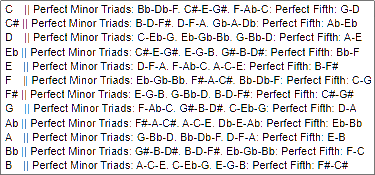 |
In each inverted odd harmonic tuning, the 12 keys in each octave are tuned to ratios related to reciprocals of the first 12 odd harmonics in the harmonic series above the tuning’s root. Each tuning thus contains three perfect minor triads and an additional perfect fifth (see below). |
The MidiPitches of the basic inverted odd harmonic tuning, whose root is C, are calculated as follows:
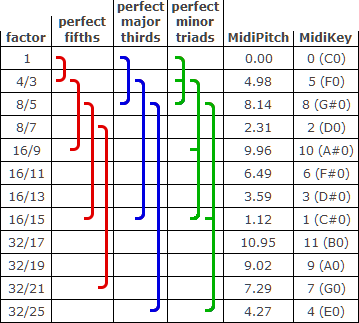
The remaining tunings are constructed as follows:
- The reciprocals of first 12 odd harmonic ratios are first transposed into the octave above the root, by multiplying each numerator by a power of 2, so that the ratio is greater than or equal to 1, and less than 2. See column 1 in the table below. Note that, as an exception, 32/25 is used instead of 32/23, resulting in a perfect major third (ratio 5/4) between MidiKey 4 and MidiKey 8.
- The equivalent intervals (in equal temperament semitone units) are then calculated using the numerators and denominators of these ratios. The above
getSemitones(frequency1, frequency2)function uses the ratio between its arguments, not their absolute values, so the numerators and denominators can be used directly, rather than using frequencies:getSemitones(numerator, denominator). Adding the resulting intervals to MidiPitch 0.00 (at MidiKey 0) gives the MidiPitches in column 5. - MidiKeys are allocated in ascending MidiPitch order (column 6).
- Upper octaves in the tuning are created by simply adding 12.00 semitones per octave to the lowest octave. For example, the MidiPitch at Tuning[8+12] is Tuning[8] + 12.00.
The remaining tunings are constructed as follows:
- "rotate" the MidiPitches in the original 12 value C0 Tuning for each root, transposing an octave down where necessary.
- add each Tuning’s rootKey value to each of its MidiPitches, so that Tuning[rootKey] is equal to rootKey.
This gives the following table for the MidiPitches in the lowest octave: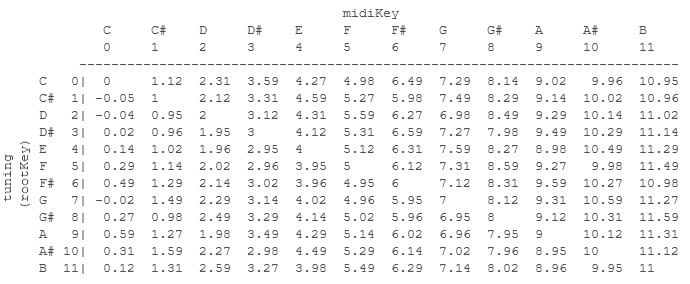
- Use this table to calculate the MidiPitches in the upper octaves of each Tuning. (Simply add 12.00 semitones per octave for each MidiPitch.)
- As a precaution, set all the negative MidiPitches in C0 to 0.00.
The ResidentSynthHost can instantly change its Tuning, +semi and +cent control settings, so shifting seamlessly between arbitrary Tunings on arbitrary MidiKeys is always possible but, since all inverted odd harmonic tunings contain three perfect minor triads, pivoting between Tunings can also be done around these:
For example: the A-minor triad ACE exists in inverted tunings G-sharp and B so, adjusting the MidiPitch of inverted Tuning B so that MidiKey A has the MidiPitch it has in inverted Tuning G-sharp, will preserve the relations between the frequencies in the minor triad ACE.
Interesting symmetry: Each minor triad is contained in three inverted tunings, and each inverted tuning contains three minor triads.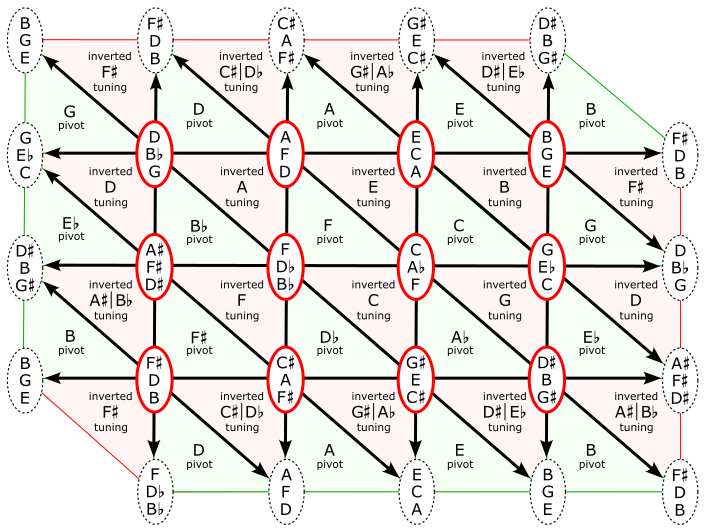
For example: the A-minor triad ACE exists in inverted tunings G-sharp and B so, adjusting the MidiPitch of inverted Tuning B so that MidiKey A has the MidiPitch it has in inverted Tuning G-sharp, will preserve the relations between the frequencies in the minor triad ACE.
Interesting symmetry: Each minor triad is contained in three inverted tunings, and each inverted tuning contains three minor triads.
prime harmonic tunings
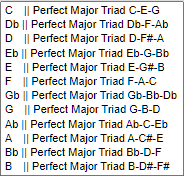 |
In each prime harmonic tuning, the 12 keys in each octave are tuned to
ratios related to the first 12 odd prime harmonics above the tuning’s root. Each of these tunings contains a single major triad, but is otherwise maximally dissonant since no frequencies have common factors. |
The MidiPitches of the basic prime harmonic tuning, whose root is C, are calculated as follows:
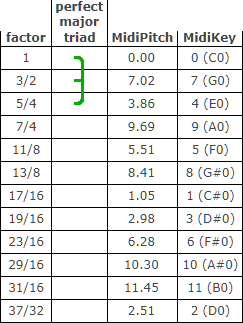
As with the other harmonic tunings, the remaining tunings are constructed as follows:
- The first 12 odd prime harmonic ratios are first transposed into the octave above the root, by multiplying each denominator by a power of 2, so that the ratio is greater than or equal to 1, and less than 2. See column 1 in the table below.
- As with the other harmonic tunings, the equivalent intervals (in equal temperament semitone units) are then calculated using the numerators and denominators of these ratios, and added to MidiPitch 0.00 (at MidiKey 0) to give the MidiPitches in column 3.
- MidiKeys are allocated in ascending MidiPitch order (column 4).
- Upper octaves in the tuning are created by simply adding 12.00 semitones per octave to the lowest octave. For example, the MidiPitch at Tuning[8+12] is Tuning[8] + 12.00.
As with the other harmonic tunings, the remaining tunings are constructed as follows:
- "rotate" the MidiPitches in the original 12 value C0 Tuning for each root, transposing an octave down where necessary.
- add each Tuning’s rootKey value to each of its MidiPitches, so that Tuning[rootKey] is equal to rootKey.
This gives the following table for the MidiPitches in the lowest octave: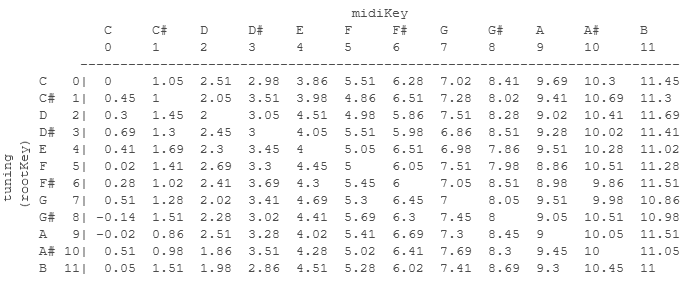
- Use this table to calculate the MidiPitches in the upper octaves of each Tuning. (Simply add 12.00 semitones per octave for each MidiPitch.)
- As a precaution, set all the negative MidiPitches in C0 to 0.00.
inverted prime harmonic tunings
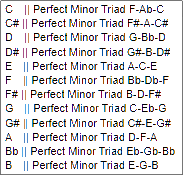 |
In each inverted prime harmonic tuning, the 12 keys in each octave are tuned to
ratios related to reciprocals of the first 12 odd prime harmonics above the tuning’s root. Each of these tunings contains a single minor triad, but is otherwise maximally dissonant since no frequencies have common factors. |
The MidiPitches of the basic inverted prime harmonic tuning, whose root is C, are calculated as follows:
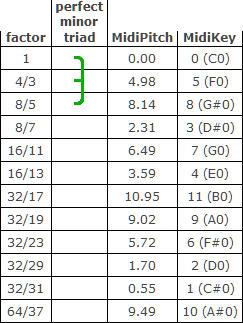
As with the other harmonic tunings, the remaining tunings are constructed as follows:
- The reciprocals of the first 12 odd prime harmonic ratios are first transposed into the octave above the root, by multiplying each nominator by a power of 2, so that the ratio is greater than or equal to 1, and less than 2. See column 1 in the table below.
- As with the other harmonic tunings, the equivalent intervals (in equal temperament semitone units) are then calculated using the numerators and denominators of these ratios, and added to MidiPitch 0.00 (at MidiKey 0) to give the MidiPitches in column 3.
- MidiKeys are allocated in ascending MidiPitch order (column 4).
- Upper octaves in the tuning are created by simply adding 12.00 semitones per octave to the lowest octave. For example, the MidiPitch at Tuning[8+12] is Tuning[8] + 12.00.
As with the other harmonic tunings, the remaining tunings are constructed as follows:
- "rotate" the MidiPitches in the original 12 value C0 Tuning for each root, transposing an octave down where necessary.
- add each Tuning’s rootKey value to each of its MidiPitches, so that Tuning[rootKey] is equal to rootKey.
This gives the following table for the MidiPitches in the lowest octave: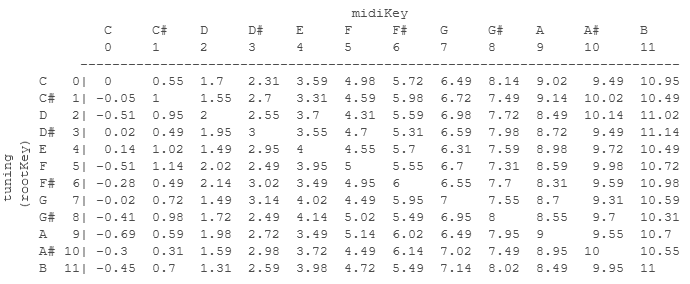
- Use this table to calculate the MidiPitches in the upper octaves of each Tuning. (Simply add 12.00 semitones per octave for each MidiPitch.)
- As a precaution, set all the negative MidiPitches in C0 to 0.00.
Baroque tunings (Poletti)
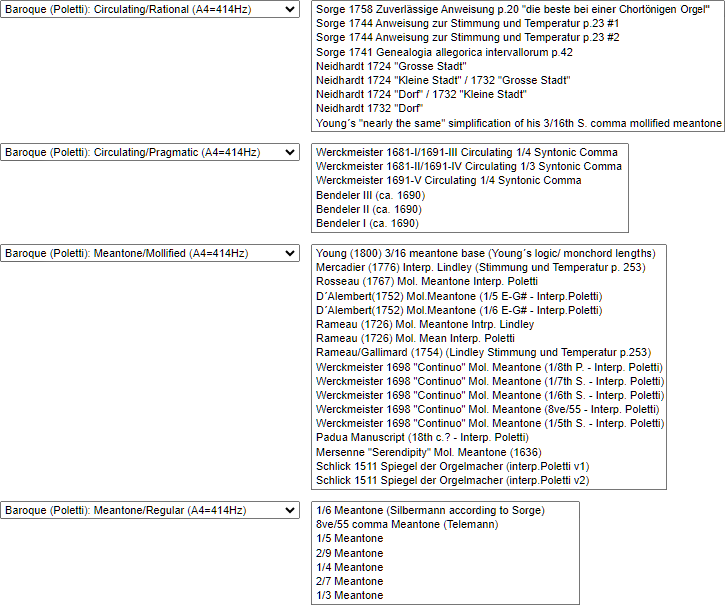
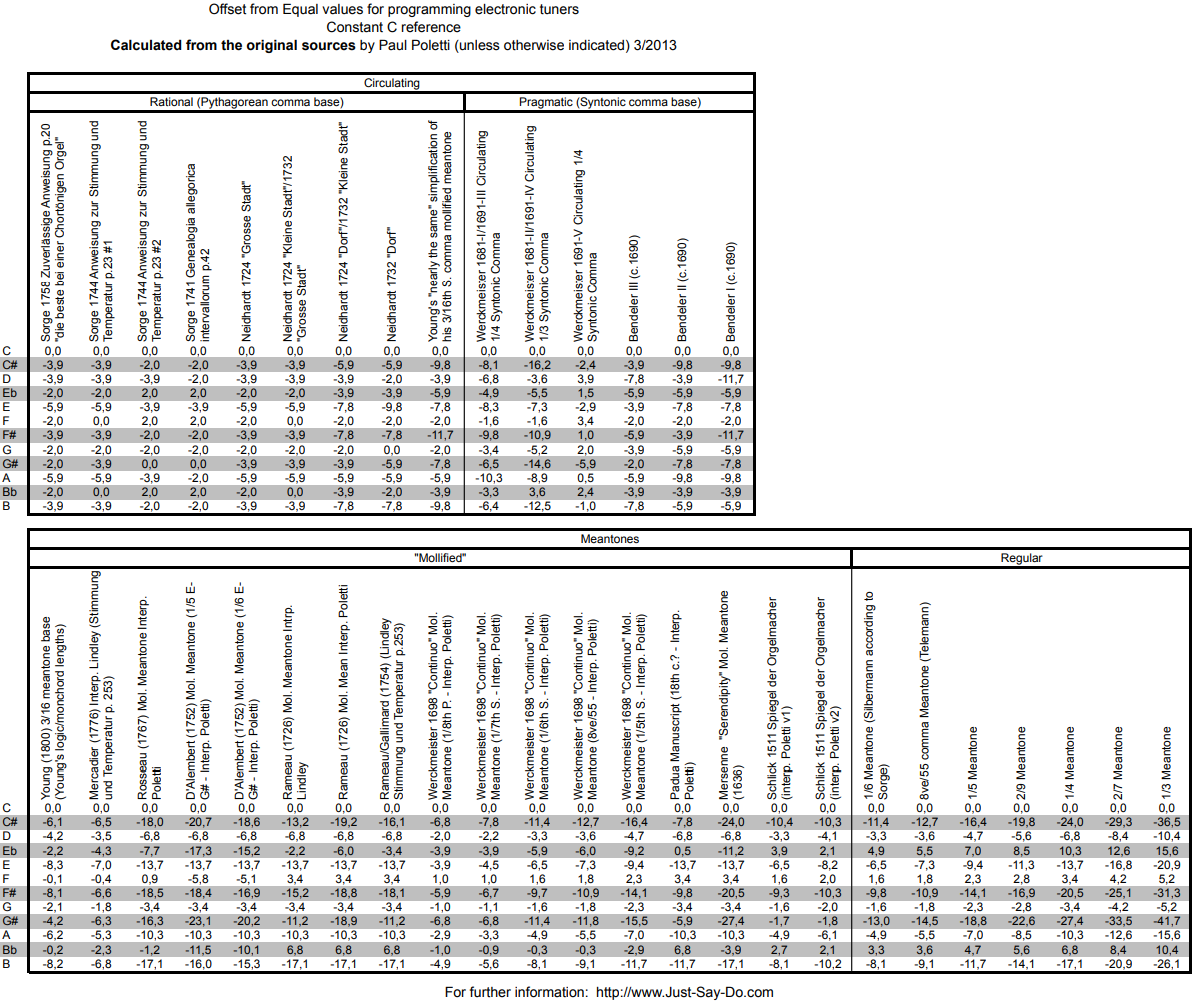
These tunings were all calculated using the following table, setting A4 consistently to 414Hz.